
M-M-OO1
COMPUTER APPLICATION (DCA)
| Course Duration | 12 MONTHS |
|---|---|
| Course Fees | ₹ 13,500.00
|
| Eligibility | Eligibility : 1) 10th passed 2) 12th passed |
| Award | 4 |
Course Details
Basic Computer Course Syllabus
The topics covered in a basic computer course are parts of computers, computer networks, the internet, computer hardware & software, and many more. The complete list of topics and a detailed basic computer course syllabus are mentioned below.
Topics
Subtopics
Computer Applications & Basics
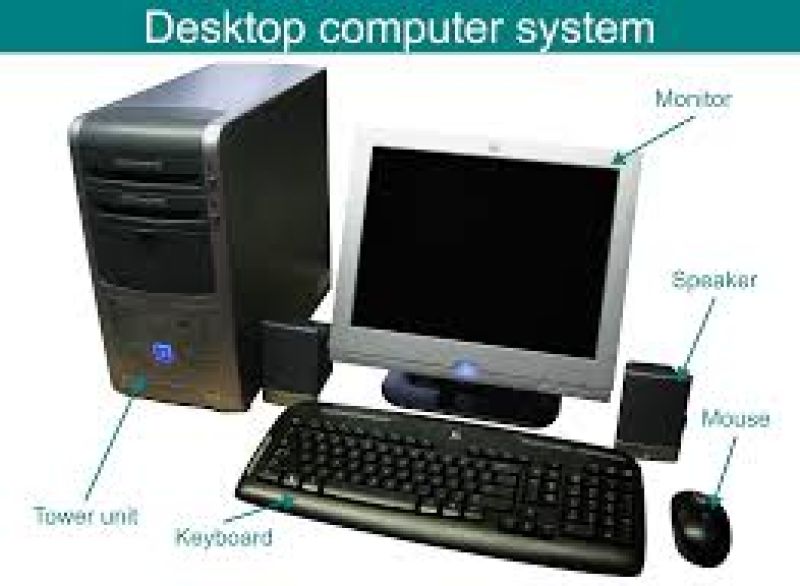
Introduction, Basic Applications of Computer, Components of Computer, Connecting Computer Components, Computer Hardware & Software
Computer Operating System
Basics of Operating System, Linux, Windows, Task Icons, Bars, System Settings, Setting Date & Time, File Management
Word Processing
Introduction, Printing a File, Document Creation & Editing, Saving, Text Formatting
Microsoft Excel & Using Spreadsheets
Introduction, Rows, Columns & Cells, Basics Excel Formulas and Functions
Introduction to Internet, WWW & Web Browsers
Basics of Computer Networks, Internet, Search Engines, URLs, How to Use Web Browser
Communications & Collaboration
Basics of Email, How to Use Email, Instant Messaging, Format an Email
Making Small Presentation
How to Create, Edit, Format, or Delete Slides, Make a Slideshow, Save a Presentation, Printing of Presentation
Banking (Basics & Services)
How to Save Money, Use ATM, Importance of Banks, Bank Services & Schemes
What is Basic Computer Course?
Basic computer courses are focused on the basics of computers including computer types, Computer Applications, hardware systems, and more.
They also cover the basics of various areas such as Web Designing, computer technology, VFX and Animation, Microsoft office, Tally, etc.
The topics/ contents of the course may vary depending on the course type, duration, and institution; however, some of the areas of study include computer basics, number systems, hardware and software, Windows XP, etc.
Basic computer courses are suitable for those who want to learn computer basics, for various purposes; jobs, personal, and business purposes.
Having a basic knowledge of computers can help you land a better job, advance your career, and put yourself above other employees.
Also Check: 10 Best Basic Computer Courses on Udemy
Basic Computer Course Contents
The course contents for the basic computer course are given in detail below:
Computer Basics: Introduction to Computer, History, Characteristics, Types, Application, Basic Components, Computer Architecture, etc.
Number Systems: Introduction to Number System, Classification and Types of Number System, Base Conversion, using Shortcut Method, etc.
Hardware and Software: Introduction, Computer Memory, Peripherals, Output Devices, Software, and Requirements, etc.
Windows XP: Features, Comparison, Windows XP installation, Activating and Security features, User Accounts, Getting Help, etc.
MS Word: Introduction, Windows Interface, Word Application, Viewing Documents, Basic and Advanced Formatting, Navigating through a Word Document, Printing Documents, Preview, etc.
Excel 2007: Introduction to Excel, Workbook, Worksheet, Formatting, Advanced formatting, Printing worksheets, etc
MS PowerPoint: MS PowerPoint Introduction, Creating Presentations, Basic and Advanced Formatting, Using Templates, Inserting charts and tables, etc.
Security and Networking: Introduction to security and networking, File Sharing, Internet Services, p2p Networking, etc.
IT Act 2008
Explore:
Best Udemy Courses for Software Development
Best Excel Course on Udemy
Best Cyber Security Courses on Udemy
Best Network Courses Online
Best IT Courses Online
–
Basic Computer Books for Beginners
Name of the Book
Author
Absolute Beginners Guide to Computing
Wallace Wang
Computer Basics Absolute Beginner's Guide
Michael Miller
Computers for Seniors: Email, Internet, Photos & More in 14 Easy Lessons
Chris Ewin, Carrie Ewin, and Cheryl Ewin
Computers for Seniors for Dummies
Nancy C. Muir
Computers Made Easy from Dummy to Geek
James Bernstein
Is This Thing On?: A Friendly Guide to Everything Digital for Newbies, Technophobes, and The Kicking & Screaming
Abby Stokes
Computer Science Beginners Crash Course: Coding Data, Python, Algorithms & Hacking
Ian Batantu
Basic Computer Course Made Simple
Prof. Satish Jain, Dr. Shalini Jain & M. Geetha
Basic Computer Course
Soumya Ranjan Behera
Computer Fundamentals: Concepts, Systems & Applications- 8th Edition
Priti Sinha, Pradeep K, Sinha
3 Month Computer Basic Course Syllabus
3-month computer basic course covers computer fundamentals, overview, MS-DOS, Windows XP/ 2007, and more. The detailed syllabus for the 3-month computer basic course including the topics and sub-topics is given below in the table.
Fundamentals of Computer
Introduction
Input/ Output & Processing (CPU)
Input/ Output & Processing (CPU)
Memory Device
Types of Computers
Characteristics of Computer
History & Generation
Applications of Computer
Windows XP
Basic Terminology & Typing
Desktop Settings & Control Panel
MS Docs
MS Paint
WordPad
Accessories & Multimedia
Email & Internet
Introduction
Email Account & Its Functions
Search Engine
Surfing Web Pages
Basics of Social Networking Site
-
Virus
General Introduction
Antivirus Utilities
Application Software
Microsoft Word
Microsoft PowerPoint
Microsoft Excel
-
Practically Performed activities
Windows Seven Overview
Burning CD/DVD
Basics of Audio/ Video editing
Fundamentals of Hardware & Networking
Formatting Hard Disk
Installing Windows
6 Month Computer Course Syllabus
6-month computer courses are available as diploma and certificate courses in areas such as computer application. Here are the details of the 6 months course in the computer syllabus.
Operating Systems
Introduction of Computer Parts
Window Installation
Driver Installation
Software Installation
Disk Management
Device Manager
MS Word
Home
Insert
Page Layout
References
Mailing
Review
View
-
MS Excel
Home
Insert
Page Layout
Formulas
Data
Review
View
-
Power Point
Design
Animation
Slideshow
-
MS-Access
Home
Create
External Data
Database Tools
Datasheet
-
Internet
Introduction to Internet
Surfing
Email
Create Account
Sending & Receiving emails
Web Browsers
Downloading & Uploading
Google Drive
Search Engines
-
Digital Services
Net Banking
Debit/Credit Card Transactions
E-wallet
UPI
Fraud Emails
Spams
Trojan/virus
-
NIELIT Basic Computer Course Syllabus
NIELIT basic computer course is aimed at common people covering the basics of computers. This course is aimed to provide knowledge of computer basics, preparing his personal/ business letters, using internet & banking services, sending mails, etc. The list of topics covered in NIELIT courses in the computer syllabus is mentioned below.
Syllabus
Topics
Knowing Computer
What is Computer, Components of Computer System, Concepts of Hardware and Software, Concept of Computing, Data and Information, Applications of IECT
Operating Computer using GUI Based Operating System
What is an Operating System, Basics of Popular Operating Systems, The User Interface, Operating System Simple Setting, File and Directory Management, Common Utilities
Understanding Word Processing
Word Processing Basics, Opening and Closing Documents, Text Creation and Manipulation, Formatting the Text, Table Manipulation
Using Spreadsheet
Basics of Spreadsheet, Elements of Electronic Spreadsheet, Manipulation of Cells, Formulas, and Functions
Introduction to Internet, WWW, and web browsers
Basic of Computer Networks, Internet, World Wide Web (WWW), Web Browsing Software, Search Engines, Understanding URLs, Surfing the Web
Communications and Collaboration
Basics of Electronic Mail, Using Emails, Document Collaboration, Instant Messaging
Making small presentation
Introduction, Creation of Presentation, Preparation of Slides, Slideshow
Financial Literacy for Banking Scheme and Applications
Importance of Saving, Drawbacks of Keeping Cash at Home, Services offered by Bank, Banking Service Delivery Channels, Schemes, Insurance
The topics covered in a basic computer course are parts of computers, computer networks, the internet, computer hardware & software, and many more. The complete list of topics and a detailed basic computer course syllabus are mentioned below.
Topics
Subtopics
Computer Applications & Basics
Introduction, Basic Applications of Computer, Components of Computer, Connecting Computer Components, Computer Hardware & Software
Computer Operating System
Basics of Operating System, Linux, Windows, Task Icons, Bars, System Settings, Setting Date & Time, File Management
Word Processing
Introduction, Printing a File, Document Creation & Editing, Saving, Text Formatting
Microsoft Excel & Using Spreadsheets
Introduction, Rows, Columns & Cells, Basics Excel Formulas and Functions
Introduction to Internet, WWW & Web Browsers
Basics of Computer Networks, Internet, Search Engines, URLs, How to Use Web Browser
Communications & Collaboration
Basics of Email, How to Use Email, Instant Messaging, Format an Email
Making Small Presentation
How to Create, Edit, Format, or Delete Slides, Make a Slideshow, Save a Presentation, Printing of Presentation
Banking (Basics & Services)
How to Save Money, Use ATM, Importance of Banks, Bank Services & Schemes
What is Basic Computer Course?
Basic computer courses are focused on the basics of computers including computer types, Computer Applications, hardware systems, and more.
They also cover the basics of various areas such as Web Designing, computer technology, VFX and Animation, Microsoft office, Tally, etc.
The topics/ contents of the course may vary depending on the course type, duration, and institution; however, some of the areas of study include computer basics, number systems, hardware and software, Windows XP, etc.
Basic computer courses are suitable for those who want to learn computer basics, for various purposes; jobs, personal, and business purposes.
Having a basic knowledge of computers can help you land a better job, advance your career, and put yourself above other employees.
Also Check: 10 Best Basic Computer Courses on Udemy
Basic Computer Course Contents
The course contents for the basic computer course are given in detail below:
Computer Basics: Introduction to Computer, History, Characteristics, Types, Application, Basic Components, Computer Architecture, etc.
Number Systems: Introduction to Number System, Classification and Types of Number System, Base Conversion, using Shortcut Method, etc.
Hardware and Software: Introduction, Computer Memory, Peripherals, Output Devices, Software, and Requirements, etc.
Windows XP: Features, Comparison, Windows XP installation, Activating and Security features, User Accounts, Getting Help, etc.
MS Word: Introduction, Windows Interface, Word Application, Viewing Documents, Basic and Advanced Formatting, Navigating through a Word Document, Printing Documents, Preview, etc.
Excel 2007: Introduction to Excel, Workbook, Worksheet, Formatting, Advanced formatting, Printing worksheets, etc
MS PowerPoint: MS PowerPoint Introduction, Creating Presentations, Basic and Advanced Formatting, Using Templates, Inserting charts and tables, etc.
Security and Networking: Introduction to security and networking, File Sharing, Internet Services, p2p Networking, etc.
IT Act 2008
Explore:
Best Udemy Courses for Software Development
Best Excel Course on Udemy
Best Cyber Security Courses on Udemy
Best Network Courses Online
Best IT Courses Online
–
Basic Computer Books for Beginners
Name of the Book
Author
Absolute Beginners Guide to Computing
Wallace Wang
Computer Basics Absolute Beginner's Guide
Michael Miller
Computers for Seniors: Email, Internet, Photos & More in 14 Easy Lessons
Chris Ewin, Carrie Ewin, and Cheryl Ewin
Computers for Seniors for Dummies
Nancy C. Muir
Computers Made Easy from Dummy to Geek
James Bernstein
Is This Thing On?: A Friendly Guide to Everything Digital for Newbies, Technophobes, and The Kicking & Screaming
Abby Stokes
Computer Science Beginners Crash Course: Coding Data, Python, Algorithms & Hacking
Ian Batantu
Basic Computer Course Made Simple
Prof. Satish Jain, Dr. Shalini Jain & M. Geetha
Basic Computer Course
Soumya Ranjan Behera
Computer Fundamentals: Concepts, Systems & Applications- 8th Edition
Priti Sinha, Pradeep K, Sinha
3 Month Computer Basic Course Syllabus
3-month computer basic course covers computer fundamentals, overview, MS-DOS, Windows XP/ 2007, and more. The detailed syllabus for the 3-month computer basic course including the topics and sub-topics is given below in the table.
Fundamentals of Computer
Introduction
Input/ Output & Processing (CPU)
Input/ Output & Processing (CPU)
Memory Device
Types of Computers
Characteristics of Computer
History & Generation
Applications of Computer
Windows XP
Basic Terminology & Typing
Desktop Settings & Control Panel
MS Docs
MS Paint
WordPad
Accessories & Multimedia
Email & Internet
Introduction
Email Account & Its Functions
Search Engine
Surfing Web Pages
Basics of Social Networking Site
-
Virus
General Introduction
Antivirus Utilities
Application Software
Microsoft Word
Microsoft PowerPoint
Microsoft Excel
-
Practically Performed activities
Windows Seven Overview
Burning CD/DVD
Basics of Audio/ Video editing
Fundamentals of Hardware & Networking
Formatting Hard Disk
Installing Windows
6 Month Computer Course Syllabus
6-month computer courses are available as diploma and certificate courses in areas such as computer application. Here are the details of the 6 months course in the computer syllabus.
Operating Systems
Introduction of Computer Parts
Window Installation
Driver Installation
Software Installation
Disk Management
Device Manager
MS Word
Home
Insert
Page Layout
References
Mailing
Review
View
-
MS Excel
Home
Insert
Page Layout
Formulas
Data
Review
View
-
Power Point
Design
Animation
Slideshow
-
MS-Access
Home
Create
External Data
Database Tools
Datasheet
-
Internet
Introduction to Internet
Surfing
Create Account
Sending & Receiving emails
Web Browsers
Downloading & Uploading
Google Drive
Search Engines
-
Digital Services
Net Banking
Debit/Credit Card Transactions
E-wallet
UPI
Fraud Emails
Spams
Trojan/virus
-
NIELIT Basic Computer Course Syllabus
NIELIT basic computer course is aimed at common people covering the basics of computers. This course is aimed to provide knowledge of computer basics, preparing his personal/ business letters, using internet & banking services, sending mails, etc. The list of topics covered in NIELIT courses in the computer syllabus is mentioned below.
Syllabus
Topics
Knowing Computer
What is Computer, Components of Computer System, Concepts of Hardware and Software, Concept of Computing, Data and Information, Applications of IECT
Operating Computer using GUI Based Operating System
What is an Operating System, Basics of Popular Operating Systems, The User Interface, Operating System Simple Setting, File and Directory Management, Common Utilities
Understanding Word Processing
Word Processing Basics, Opening and Closing Documents, Text Creation and Manipulation, Formatting the Text, Table Manipulation
Using Spreadsheet
Basics of Spreadsheet, Elements of Electronic Spreadsheet, Manipulation of Cells, Formulas, and Functions
Introduction to Internet, WWW, and web browsers
Basic of Computer Networks, Internet, World Wide Web (WWW), Web Browsing Software, Search Engines, Understanding URLs, Surfing the Web
Communications and Collaboration
Basics of Electronic Mail, Using Emails, Document Collaboration, Instant Messaging
Making small presentation
Introduction, Creation of Presentation, Preparation of Slides, Slideshow
Financial Literacy for Banking Scheme and Applications
Importance of Saving, Drawbacks of Keeping Cash at Home, Services offered by Bank, Banking Service Delivery Channels, Schemes, Insurance
Eligibility & Requirements
Eligibility :
1) 10th passed
2) 12th passed
1) 10th passed
2) 12th passed
Keep Exploring
Other Courses
BASIC COMPUTER
Introduction to Windows Desktop Management Working with The Control Panel F...

COMPUTER APPLICATION (ADCA)
DTP Syllabus: All the Students will use the Adobe Creative Suite in this...

NURSERY TEACHER TRAINING
For more information please contact to the your home branch or head office